01
Browser Extension Import
ImplementedThe Manifest V3 extension captures the currently visible posting, lets the user review extracted fields, and sends a bounded payload only to the local receiver.
- Chrome / Edge
- Explicit capture
RAW TO RELIABLE / LAB CASE STUDY / SYSTEM 01
A local-first job research and application workflow for importing roles, evaluating fit, tracking evidence, detecting duplicates, and preserving human review at every step.
The system turns an inconsistent browser-based job search into a controlled workflow with structured ingestion, offline analysis, persistent state, duplicate protection, and reviewable outputs.
Automation prepares the decision. The user keeps control of the decision and submission.
Core capabilities
Technology
01 / Executive Overview
Job Search OS is a developing local-first workflow system designed to make job evaluation more structured, consistent, and reviewable. It connects browser-based job discovery with a local analysis environment where job descriptions can be imported, scored, compared, tracked, and preserved without delegating the final decision or application submission to automation.
The system emerged from a practical problem: job postings arrive through inconsistent sources and formats, while fit decisions depend on more than keyword overlap. The workflow therefore combines structured extraction, profile evidence, configurable scoring, duplicate protection, persistence, local analytics, and human review.
Current State
Browser ingestion, canonical local analysis, persistence, tracking, duplicate protection, and a read-only dashboard are implemented.
Active Refinement
Score calibration, source-field cleanup, interface refinement, and ranked-shortlist workflow design.
Target Assistance
Application-material drafts, controlled browser prefilling, historical workflow analytics, and expanded exports.
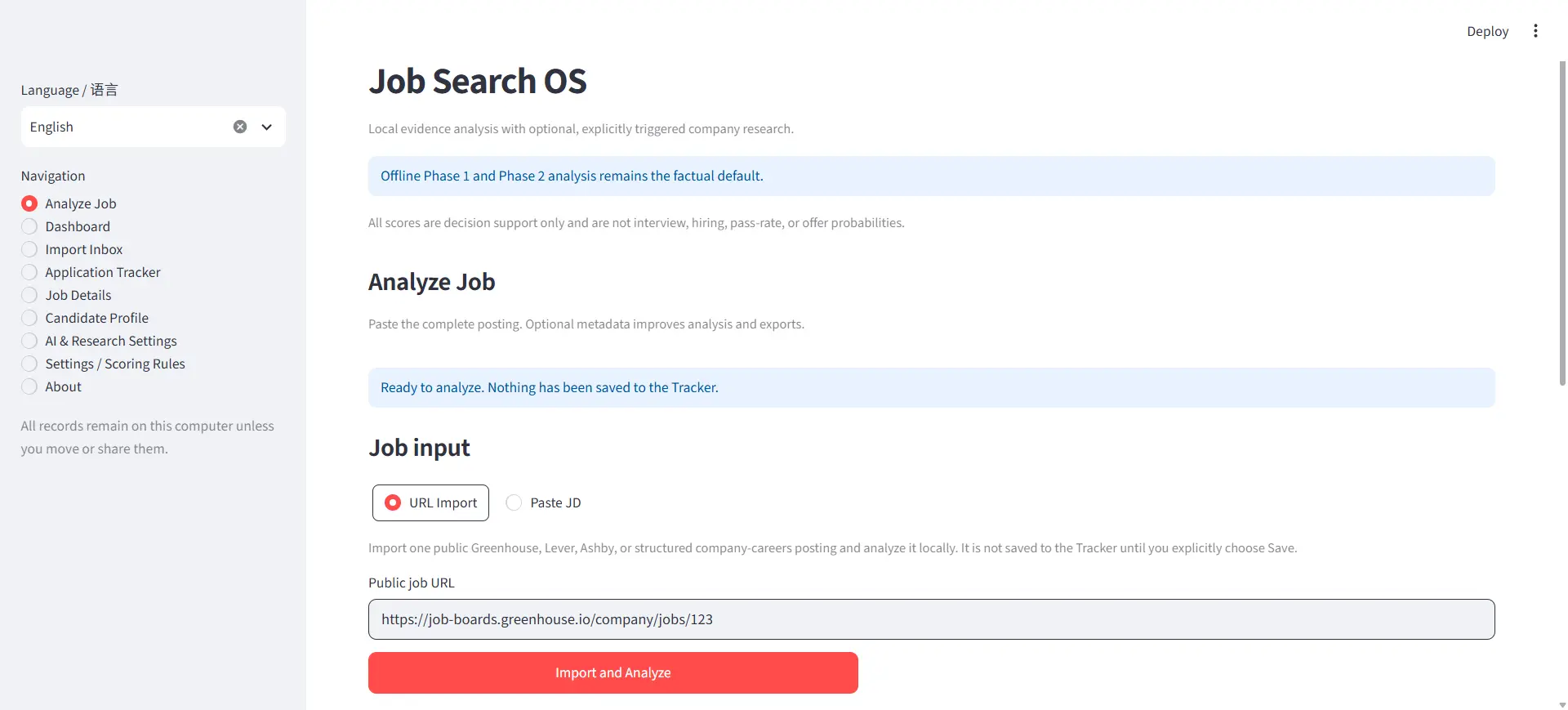
Job Search OS workspace for importing, analyzing, and reviewing job opportunities.
02 / Problem
Traditional job-search workflows are fragmented across browser tabs, saved links, spreadsheets, ATS pages, résumé versions, and memory. The same role may be evaluated multiple times, copied inconsistently, or scored differently depending on how its description was imported.
Keyword matching alone also fails to capture whether the candidate has evidence for the employer’s actual requirements. A useful system must preserve the source job description, normalize the input, compare it against a structured profile, explain the evidence behind the score, detect duplicates, and maintain application state.
Product problem dimensions
03 / Product Principles
Job descriptions, evaluations, drafts, and tracking state remain in a local workflow by default.
A fit score is supported by explicit evidence, missing requirements, and reviewable reasoning rather than keyword overlap alone.
Normalization and duplicate detection work together to prevent the same job from producing multiple inconsistent records.
Automation may extract, organize, analyze, and draft, but the user reviews the result and controls final submission.
Drafts and tracked jobs survive interruptions and remain reloadable across local sessions.
The interface shows how a job entered the system, why it received its score, and what evidence supports the result.
A local browser-to-application bridge still requires authentication, rate limiting, controlled origins, and careful input handling.
04 / System Architecture
Automation boundary ends before final submission.
05 / Job Ingestion
Supported extraction strategies cover several common sources and explicit fallback handling without claiming universal ATS compatibility.
01
The Manifest V3 extension captures the currently visible posting, lets the user review extracted fields, and sends a bounded payload only to the local receiver.
02
The application imports supported public job URLs through guarded HTTP handling and the same canonical analysis contract used by pasted input.
03
A job description can be pasted directly when automated extraction is unavailable, incomplete, or not appropriate.
04
Explicitly selected page text replaces prior capture content and records its provenance when structured extraction is unreliable.
05
Canonical job-description normalization is implemented; source-specific company, title, location, URL, and questionnaire cleanup continues.
Confirmed extraction coverage
06 / Import Inbox
The Import Inbox separates browser capture from permanent job records. Imported roles remain inspectable, retryable, and removable before a durable Tracker decision.
The local receiver accepts and stores a validated payload.
Company, title, location, URL, source, description, provenance, and warnings remain inspectable.
Confidence, analysis result, and duplicate state inform the next action.
The user retries, archives, deletes, or approves a save.
An approved item becomes a durable Tracker record at most once.
01
Each item preserves capture platform, source URL, import time, provenance, confidence, and extraction warnings.
02
Inbox items can be analyzed locally and display fit results without starting optional company research.
03
Existing Tracker matches and repeated captures remain visible before a permanent save.
04
Failed items can be retried; reviewed items can be archived; Inbox deletion does not remove an already-saved Tracker record.
05
Stable input fingerprints and save state prevent repeated processing from producing multiple records.
07 / Fit Score & Evidence
The Fit Score is a configurable prioritization aid. It summarizes how strongly a job description aligns with the candidate profile, required skills, role direction, constraints, and available evidence. It is not an employment prediction or an objective measure of candidate quality.
Decision support only / Not a hiring probability / Human interpretation required
01
Configurable YAML rules evaluate role, skill, seniority, work arrangement, responsibilities, and hard-stop conditions.
02
Normalized requirements are matched to a validated profile and explicit evidence categories, with partial and missing evidence kept distinct.
03
Overall fit, recommendation, strengths, gaps, evidence sources, limitations, and warnings remain reviewable in the analyzer.
04
Equivalent URL, browser, and pasted inputs share normalized job-description handling and provenance-neutral deterministic scoring.
05
English and Simplified Chinese catalogs cover application navigation, analysis, Inbox, dashboard, and settings workflows.
06
An explicit consent-gated OpenAI workflow can add sourced company context without replacing offline scores or running by default.
07
Thresholds, role-family treatment, evidence explanations, and prioritization behavior continue to be refined against deterministic regression cases.
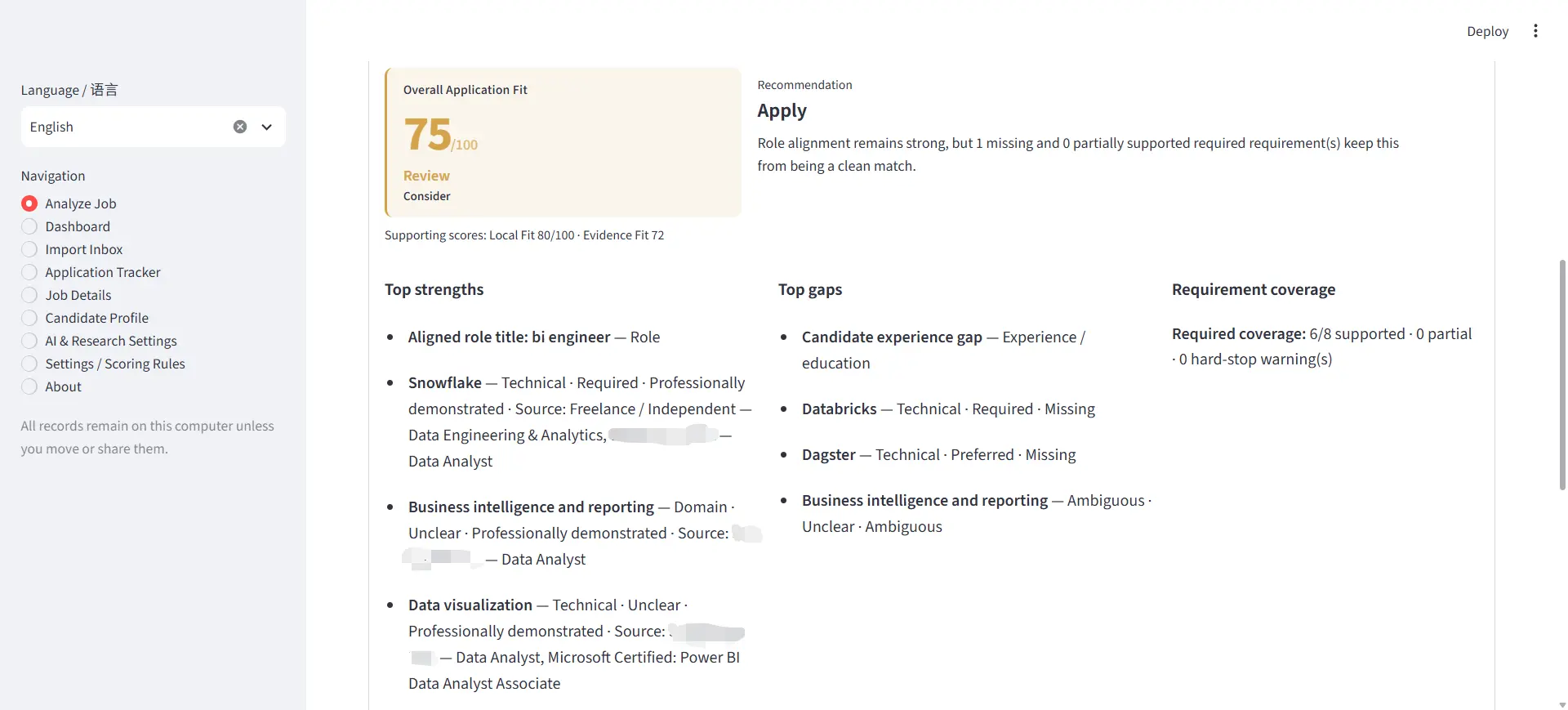
Role-fit analysis combining an overall score, evidence, skill alignment, and identified gaps.
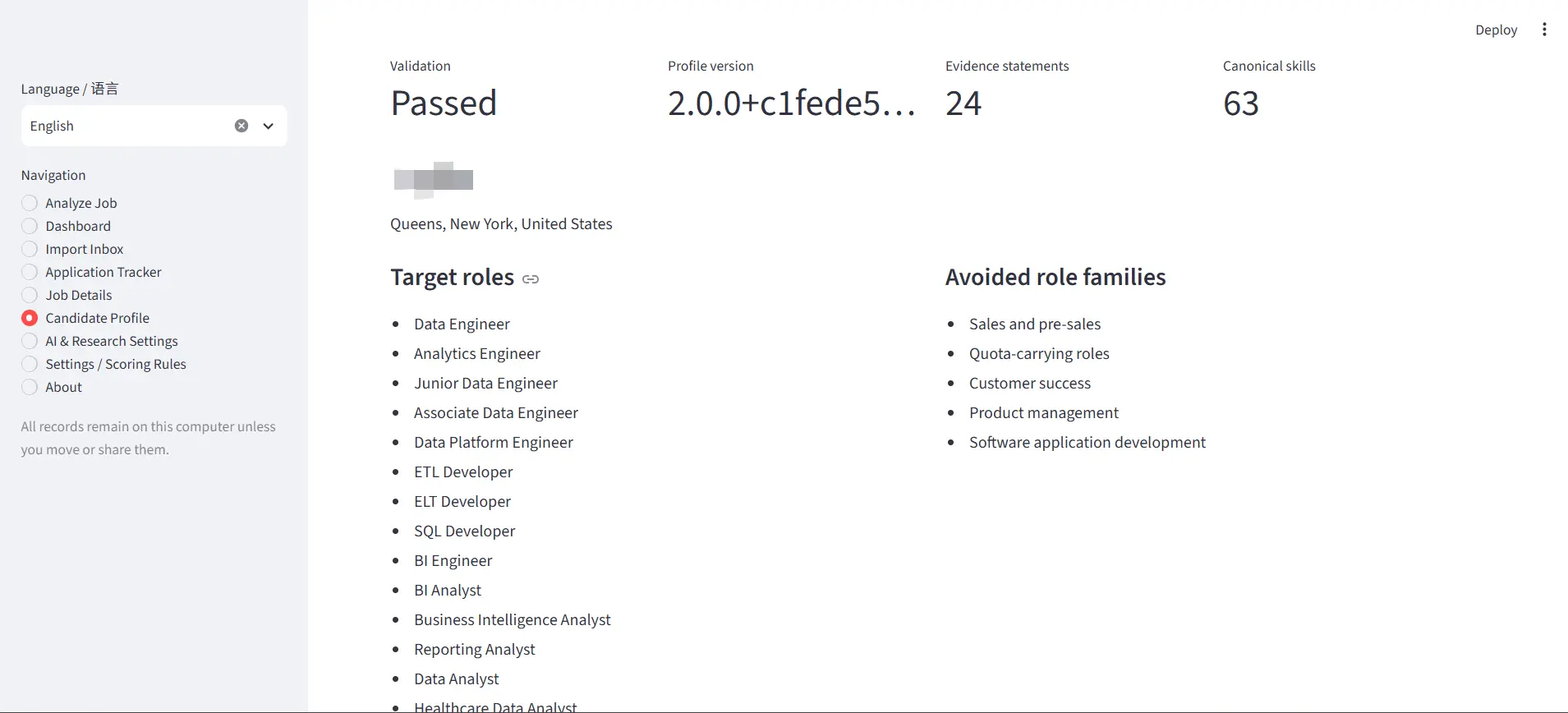
Structured candidate profile used as evidence for repeatable job-fit analysis.
08 / Tracker & Persistence
Draft, Inbox, and Tracker records have distinct lifecycle roles so temporary analysis state does not silently become a permanent application record.
01
Saved jobs, deterministic analysis snapshots, status, notes, source metadata, recommendations, and score fields persist locally.
02
The active analyzer draft survives reruns, language changes, and ordinary interruptions without becoming a Tracker record.
03
Saved jobs can be reopened, intentionally re-analyzed, updated, or copied into a new draft.
04
Archived and soft-deleted jobs remain distinct, while Markdown, JSON, and filtered dashboard CSV outputs support local review.
05
A read-only dashboard summarizes persisted current-state workflow, fit, skills, sources, recommendations, and attention signals without triggering analysis or external calls.
06
Reliable status-entry history is not yet stored, so the dashboard does not fabricate historical funnel dates.
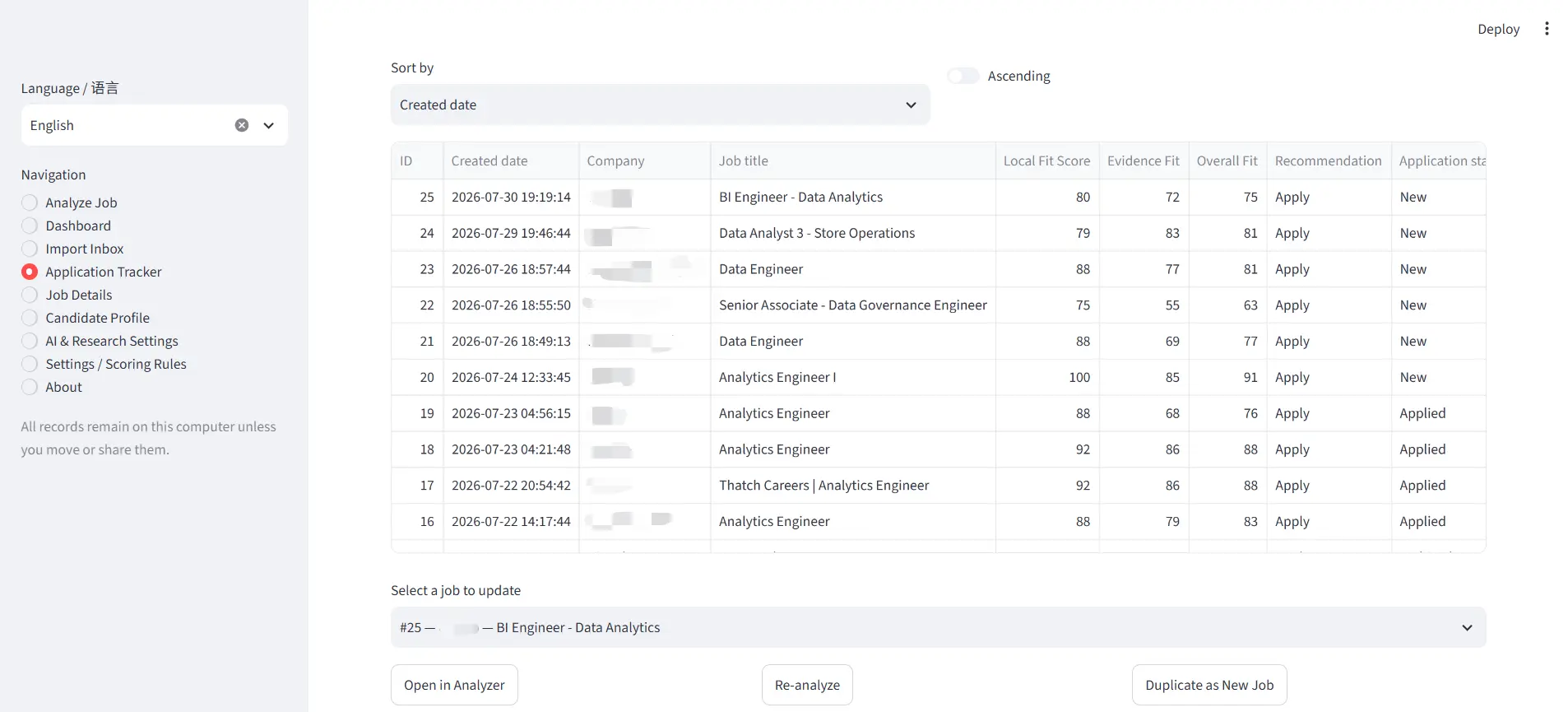
Centralized tracker for saved roles, fit scores, application status, and follow-up workflow.
Local record lifecycle
Form or imported content under review in the analyzer.
Browser payload awaiting analysis or a user decision.
Approved persistent job and analysis record.
Preserved but removed from the default active view.
Removed from the Inbox or moved to Tracker Trash according to record type.
09 / Duplicate Detection
The same role can arrive through tracking parameters, repeated browser captures, or different source representations, so duplicate protection uses several explicit signals.
01
Normalized source URLs and existing import provenance identify repeated links.
02
External job IDs are combined with the source platform where available.
03
Normalized job-description content, company, and title provide another duplicate signal.
04
A stable capture payload hash reuses equivalent recent Inbox submissions.
05
Analysis fingerprints and saved-job state keep repeated actions from creating additional records.
06
Broader semantic detection for materially similar reposts remains a future enhancement.
Duplicate protection is intentionally multi-signal rather than perfect. Reposted roles, materially changed descriptions, and inconsistent ATS identifiers can still require human review.
10 / Security & Local-First Design
The browser extension communicates with a receiver bound to the user’s local machine. Although the integration is local, it accepts structured input from a browser context and therefore uses explicit trust controls.
01
The extension and local receiver share a locally stored, rotatable token. Unauthenticated requests are rejected.
02
The receiver verifies the supplied token with a constant-time comparison to avoid simple comparison timing differences.
03
Configuration constrains the receiver to 127.0.0.1 rather than exposing it on all network interfaces.
04
Only recognized extension origins are allowed; remote web origins and unrestricted cross-origin behavior are rejected.
05
Sliding-window request limits, JSON-only handling, schema validation, and bounded payload size constrain browser submissions.
06
The extension requests active-tab, scripting, local storage, and localhost access without cookies, history, or broad remote hosts.
07
Descriptions, profile evidence, scores, drafts, and workflow state remain local by default; optional research requires explicit configuration and consent.
Local first reduces exposure, but it does not remove the need for input validation, authentication, backups, dependency maintenance, and safe secret handling.
11 / Human Review Workflow
The system prepares structured material for review.
The user verifies, decides, and performs final submission.
Final submission is outside the automated boundary.
Automated or Assisted
Import a visible role, submit a supported URL, or paste the job description.
User Control
Confirm company, title, location, URL, source, description, confidence, and warnings.
User Control
Inspect scores, evidence, gaps, requirements, limitations, and hard-stop warnings.
User Control
Use the decision workspace and local dashboard to decide whether the role deserves more effort.
Automated or Assisted
Draft a selected role’s résumé emphasis and application answers without inventing evidence.
User Control
Review every generated or eventually prefilled field before it enters an application.
User Control
The user performs the final submission and remains responsible for attestations and application content.
12 / UI Evolution
The interface evolved with the workflow: from a local scoring form into a multi-page product with evidence review, recoverable state, browser capture, local analytics, and a decision-first analyzer.
Product Stage 01
ImplementedProduct Stage 02
ImplementedProduct Stage 03
ImplementedProduct Stage 04A
ImplementedProduct Stage 04B
ImplementedProduct Stage 05A
ImplementedProduct Stage 05A.1
ImplementedCurrent Refinement
In Progress13 / Engineering Decisions
01
02
03
04
05
06
07
08
14 / Trade-offs
01
Local persistence reduces infrastructure complexity and keeps sensitive data close to the user, but it does not provide automatic multi-device synchronization.
02
Supporting several ATS and fallback methods improves coverage, but page-structure changes require ongoing selector and parser maintenance.
03
Evidence-based scoring produces more reviewable results, but it requires a richer profile model and more calibration than keyword counting.
04
Aggressive duplicate checks reduce repeated records but may require human review when a company reposts or materially modifies a role.
05
Streamlit enabled rapid workflow development and testing, while complex product interactions require increasingly deliberate state and interface design.
06
More assistance can reduce repetitive work, but application content and final submission remain deliberate human decision boundaries.
07
External research can improve context but introduces API cost, latency, and inconsistent availability, so it remains an explicit exception workflow.
15 / Current Capabilities
Capture
Manifest V3 browser extension, supported public URL import, pasted descriptions, JSON-LD, source-specific DOM extraction, and selected-text fallback.
Review
Import Inbox with provenance, confidence, warnings, duplicate state, retry, archive, delete, offline analysis, and controlled save.
Analyze
Canonical deterministic input, configurable local score, profile-aware evidence score, gaps, warnings, bilingual presentation, and decision workspace.
Persist
SQLite Tracker, draft recovery, saved-job loading, updates, copying, archiving, Trash, analysis history, and local exports.
Understand
Read-only dashboard with filters, current pipeline, fit distributions, skill demand and gaps, sources, attention signals, and safe CSV export.
Protect
Pairing token, constant-time verification, localhost binding, extension-origin controls, rate limiting, payload validation, and idempotent processing.
Refine
Source-field cleanup, role-specific score calibration, higher-quality explanations, and ranked-shortlist workflow.
Assist
Résumé and answer drafts, controlled browser prefilling, historical stage analytics, and additional backup/export controls.
16 / Current Limitations
Supported ATS extraction depends on visible page structure and requires maintenance when source markup changes.
Canonical job-description consistency is implemented, while company, title, location, URL, and questionnaire fields can still contain source-specific noise.
Fit Score remains a configurable prioritization aid that requires human interpretation, evidence review, and continuing calibration.
The product is designed for a local single-user workflow without cloud synchronization or multi-user collaboration.
Batch capture and a complete ranked-shortlist workflow are not yet integrated into one review experience.
Résumé drafting, application-answer drafting, and controlled browser-field prefilling are not complete product workflows.
The current dashboard represents current state; the database does not yet provide trustworthy status-entry history for a historical funnel.
Optional company research depends on explicit consent, an external API, source availability, and local configuration.
Final application submission remains manual as a deliberate safety and accountability boundary.
17 / Next Improvements
18 / Technology Stack